lrc-xpress

lrc-xpress
LRC Xpress Services
LRC-South members can request an Xpress service for LRC-South PRODUCTION SERVICES.
Complete the form below and then stop by the LRC-South to pick up your order.
Each patron receives a $25 credit to make educational resources in our production center. For pricing estimates and printing limits, please see our LRC-S Xpress Cost Estimate.
NJ schools can also utilize our Xpress service to coordinate a single, school-wide pickup of both Production and Library resources. Teachers place their own orders online—your school’s designated representative handles the single pickup. Fast, organized, and hassle-free for everyone!
Xpress Production Services Available:
- Die-Cuts -View Die-Cut Catalog
- Printing (Letter 8.5"x 11" or Legal 8.5"x14")
- Poster Printing (X-Small 11"x17", Small 17"x 24" or Large 24"x 33")
You MUST SUBMIT the LRC Xpress Form below to enter your order into our Production queue. Emailed requests without the form will not be processed.
LRC-South Xpress pickup is available during our regular business hours. Please see our website (go.rowan.edu/lrcabout) for current hours, holidays, and closures.
LRC Xpress Instructions
LRC XPRESS Orders (Individual)
Step 1: Prepare Your Xpress Production Order
- Create documents and save as PDF (full-color backgrounds limited to 11” x 17” or smaller).
- Select die-cut shapes (View Die Cut List) and determine quantity, color, lamination, etc.
Please Note: Library resources may be placed on HOLD without an Xpress form.
- Use the Alexandria Researcher to browse our selection of library resources, including professional books, story kits, manipulatives, subject-based content, SEL, sensory resources, and more!
- Log in to your Patron Account (LRC number & last name) and place the desired items on HOLD. This will automatically generate an email notifying the LRC-South to pull the resources - an Xpress form is NOT needed.
Step 2: Complete the LRC Xpress Form
Complete the LRC Xpress Request Form at the bottom of this page, including the date you would like to schedule pickup. Completing this form places your order in our Production queue for staff to process. Documents emailed without an accompanying Xpress Request Form will not be processed.
Please allow a minimum of 3 business days for production services. While every effort is made to process orders as quickly as possible, turnaround time varies depending upon the volume of orders we are processing at any given time.
Step 3: Confirmation
Once your order is complete and ready for pickup, LRC-South staff will contact you via email.
Step 4: Pickup
Pull your car into the "Pick-up and Drop-off Only" area in front of the LRC-South in James Hall on North Campus Drive and put your flashers on. Get Directions
Walk in through the main doors and immediately turn left towards Room 1140. If you require curbside assistance, please contact the LRC-South Circulation Desk at 856-256-4704.
School-wide LRC XPRESS Orders
Teachers place their own orders online—your school’s designated representative handles the single pickup. Fast, organized, and hassle-free for everyone!
Available only to NJ schools.
Step 1: Designate a Point of Contact for Your School
The school point of contact is the person who will coordinate pickup at the LRC-South for educators at their school.
The school contact should have a list of participating teachers.
Step 2: Update LRC-South Memberships
All school-wide participants are required to have a current, individual LRC-South membership. Membership and renewals are free of charge. Patrons can view their current account status by logging on to lrcsouth.goalexandria.com and using their membership number or email to access their Patron Account.
Step 3: Prepare Xpress Orders
Give participating teachers advance notice of your planned pickup date so they have time to submit their orders. Setting a recurring schedule—like the first Friday of every month—makes it easy for everyone to stay on track.
PRODUCTION SERVICES:
- Create documents and save as PDF (full-color backgrounds limited to 11” x 17” or smaller).
- Select die-cut shapes (View Die Cut List) and determine quantity, color, lamination, etc.
LIBRARY RESOURCES:
- Use the Alexandria Researcher to browse our vast selection of library resources, including professional books, story kits, manipulatives, subject-based content, SEL, sensory resources, and more!
- Log in to your Patron Account (LRC number & last name) and place the desired items on HOLD.
Step 4: Each Teacher Completes an LRC Xpress Form
Each teacher must complete the LRC Xpress Request Form at the bottom of this page
Please select “NJ School-Wide Xpress Pickup” on the Xpress Form and enter your school name and contact person.
Please complete this form even if you are ONLY requesting library resources. It prompts us to package the orders together for your school contact to pick up.
Completing this form places your order in our Production queue for our staff to process. Documents emailed without an accompanying Xpress Request Form will not be processed.
Please allow a minimum of 1 week for production services. While every effort is made to process orders as quickly as possible, turnaround time varies depending upon the volume of orders we are processing at any given time.
Step 5: Confirmation
Once your school's order is complete and ready for pickup, LRC-South staff will email the school contact person. If the pickup date is approaching and you have not received an email, please reach out to LRC-South (856-256-4704 or lrc_south@rowan.edu) before arriving to confirm the order will be ready for pickup.
Step 6: Pickup
The school contact person can pull their car into the "Pick-up and Drop-off Only" area in front of the LRC-South in James Hall on North Campus Drive. Get Directions
Walk in through the main doors and immediately turn left towards Room 1140. If you require curbside assistance, please contact the LRC-South Circulation Desk at 856-256-4704.
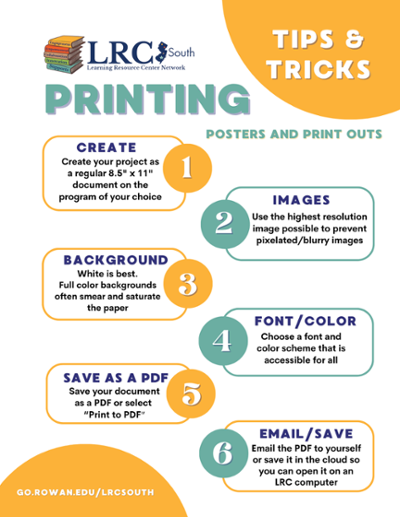
Printing Tips

LRC-South Library
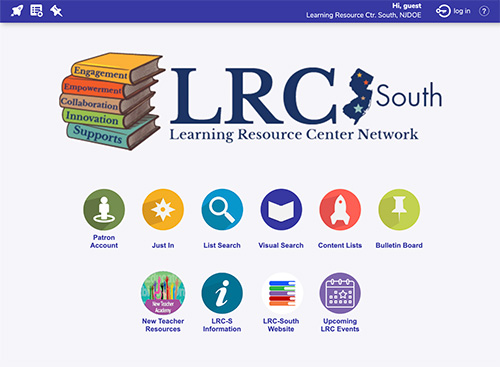
Explore our library resources online with the Alexandria Researcher to search by title, subject, author or content area. Log in to your Patron Account to put library resources on HOLD.


